Hammer AI Review 2026: Is It Safe, Free, and Worth Using?

Hammer AI has become one of the most searched adult AI tools of 2026, and there is a real reason for that. It offers something most of its rivals do not. You get unlimited free messaging, a genuinely uncensored writing mode, and a private version that runs entirely on your own computer.
Even so, the same questions come up again and again.
Is it actually free, or is the free plan a trap?
Does the uncensored side really work?
Is the website safe to use?
And can it write full length stories, or is it stuck on short chats?
This Hammer AI review answers every one of those questions in detail. Our team spent time across the free plan and all three paid plans, tested the writing on both the cloud version and the local desktop app, built characters, generated images, and wrote a long story from start to finish.
We also checked the trust signals that most reviews ignore, and we found a fake version of Hammer AI on the iPhone store that a lot of people install by mistake. Everything below comes from real use, with the exact pricing, features, and limits laid out plainly.
If you are deciding whether Hammer AI is worth your time, this guide covers everything you need to know.
Hammer AI earns a 4 out of 5 rating from us. It is one of the strongest free AI tools for adult roleplay and story writing, especially if you understand its purpose. Rather than acting as a polished AI companion, it focuses on giving writers and roleplayers greater creative freedom with fewer restrictions.
Every plan includes unlimited text messages, the mature content filter can be disabled, and the desktop app runs locally, allowing your conversations to stay on your own device. While the interface feels basic and takes some time to learn, the platform delivers an impressive writing experience once you become familiar with its features.
| Writing & Story Quality | 4.5/5 |
| Uncensored Freedom | 5/5 |
| Privacy & Safety | 4.5/5 |
| Features & Tools | 4.5/5 |
| Value for Money | 4.5/5 |
| Ease of Use | 3.5/5 |
| Overall | 4/5 |
Hammer AI offers a generous free plan with unlimited text messaging. Paid subscriptions are available at $9, $18, and $35 per month, while optional credit packs for AI image generation and voice features range from $1.99 to $99.99.
Why You Can Trust This Guide
At SmutFinder we work with AI writing and roleplay tools every single day, so we understand how this category behaves and where products tend to cut corners. That background is why this Hammer AI review goes well beyond a feature list. Everything here comes from real use, and we are just as ready to point out a weakness as a strength.
Here is how we keep this review honest.
We pay for the plans we review, so the pricing and limits come from our own accounts, not a marketing page.
We test the real product, both the website and the desktop app, across free and paid access.
We check outside sources such as trust reports and official app listings rather than trusting the sales copy.
We keep the review current, since Hammer AI changes its models and plans fairly often.
We flag problems in the open, including the fake copy of Hammer AI on the iPhone store.
The aim is simple. You should know exactly what you are getting, what it costs, and how to use it safely before you spend anything or hand over an email address.
How We Evaluated Hammer AI
We didn't base our review of Hammer AI on a quick first impression. Instead, we evaluated it using the same testing process we apply to every AI writing platform, spending time with both the free and paid versions across multiple sessions. Our assessment focused on the areas that matter most to real users.
Writing performance: We tested multiple characters and created long-form, multi-part stories to evaluate plot consistency, character accuracy, memory retention, and performance with mature content enabled.
Character creation: We built custom characters, used the built-in character generator, and imported external character cards to measure flexibility and compatibility.
Free plan value: We compared the free experience with premium features to determine what is genuinely usable without spending money.
Desktop application: We installed the desktop app, configured a local AI model, and tested offline functionality, privacy, and uncensored writing capabilities.
Images and voice: We generated images in both available styles and tested voice features to assess whether the paid credits provide worthwhile value.
Pricing evaluation: We purchased credits and explored each subscription tier to verify pricing, included features, and any additional costs.
Trust and safety: We reviewed Scamadviser's reputation report, verified the official apps, and identified copycat versions to ensure users know which downloads are legitimate.
Only after completing these tests did we finalize our rating and the recommendations shared in this review.
What Is Hammer AI?
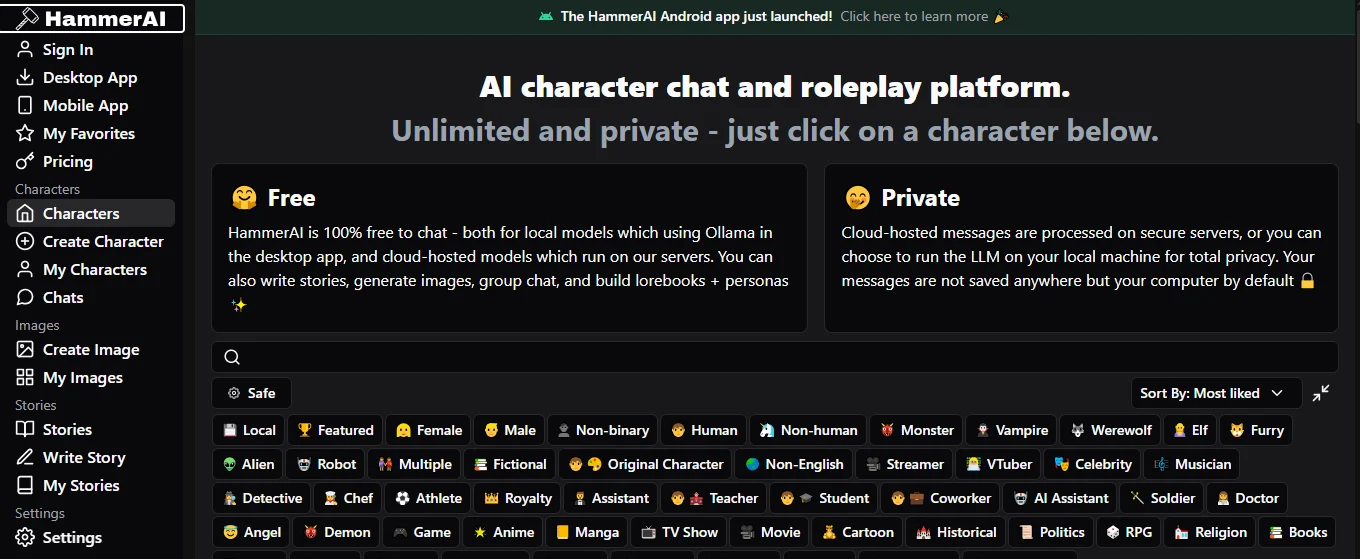
Hammer AI is an AI roleplay and storytelling platform built primarily for creative writing. Rather than focusing on the virtual companion experience, it provides powerful tools for character-driven conversations, worldbuilding, and long-form fiction.
You can use it directly through the official website, where it has built a strong user base and continues to gain recognition as a reliable AI writing platform.
One of the most important things to know is that Hammer AI is available in two different versions. Each offers a different experience, particularly when it comes to privacy, performance, and pricing.
The Cloud Version
The web version runs entirely in your browser, making it the easiest way to get started. Simply sign in, choose a character or create your own, and begin chatting or writing. Every plan includes unlimited text messages, while credits are only required for AI image generation and voice features.
It works on desktops, tablets, and smartphones, and the number of cloud AI models available depends on your subscription, ranging from two models on the free plan to fourteen on the highest tier.
The Desktop App
Hammer AI also offers a desktop application for Windows, macOS, and Linux. Designed with privacy in mind, it runs AI models locally on your computer through Ollama, allowing your chats and stories to stay on your device instead of being processed on external servers.
After the initial setup, it works offline, contains no ads, and local models are completely uncensored. The only requirement is a reasonably capable computer and a few minutes to download and configure a model. For users creating private or sensitive content, this is the most secure way to use Hammer AI and it's completely free.
Who Is Hammer AI Best For
Hammer AI is best suited for people who enjoy the creative process as much as the final result. Whether you're building original characters, developing fictional worlds, or writing detailed roleplay scenarios, the platform gives you the flexibility to shape every interaction.
Most characters are created by the community, so quality naturally varies, although many popular characters have attracted millions of conversations, reflecting strong user engagement. If you're looking for a polished AI companion with minimal setup, the interface may feel simple. However, if your priority is creative freedom and powerful writing tools, Hammer AI is one of the strongest options available.
How Popular Is Hammer AI
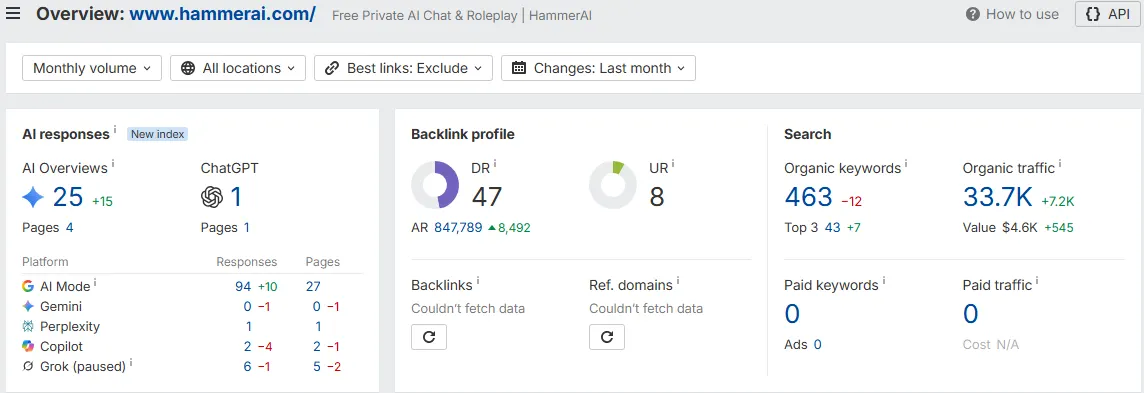
One quick way to judge whether a tool is worth your time is to look at how much real traffic it pulls and how the wider web treats it.
We checked Hammer AI against third party data from Ahrefs, and the numbers point to an established product with a steady and growing audience rather than a throwaway site.
Metric | Value |
Domain rating out of 100 | 47 |
Monthly visitors from Google | about 33,700 |
Keywords ranked on Google | 463 |
Keywords ranking in the top three | 43 |
Backlinks from other websites | 8,492 |
Shows up in Google AI answers | Yes |
A domain rating of 47 with more than thirty three thousand visitors a month is a strong sign of a real and trusted platform.
Hammer AI also appears inside Google AI Overviews and the newer AI Mode results, and it turns up in answers from other assistants such as ChatGPT and Perplexity, which means the major AI tools are surfacing it when people search for uncensored and roleplay AI.
For a product in the adult space, that reach is not something a scam or a short lived clone could build, and it supports the safety picture we cover further down.
Hammer AI Features in Detail
Hammer AI stands out because it offers far more than a basic AI chat experience. Its feature set is designed for writers, roleplayers, and creative users who want greater control over characters, stories, and worldbuilding. Here's a closer look at what the platform offers.
1. Character Library
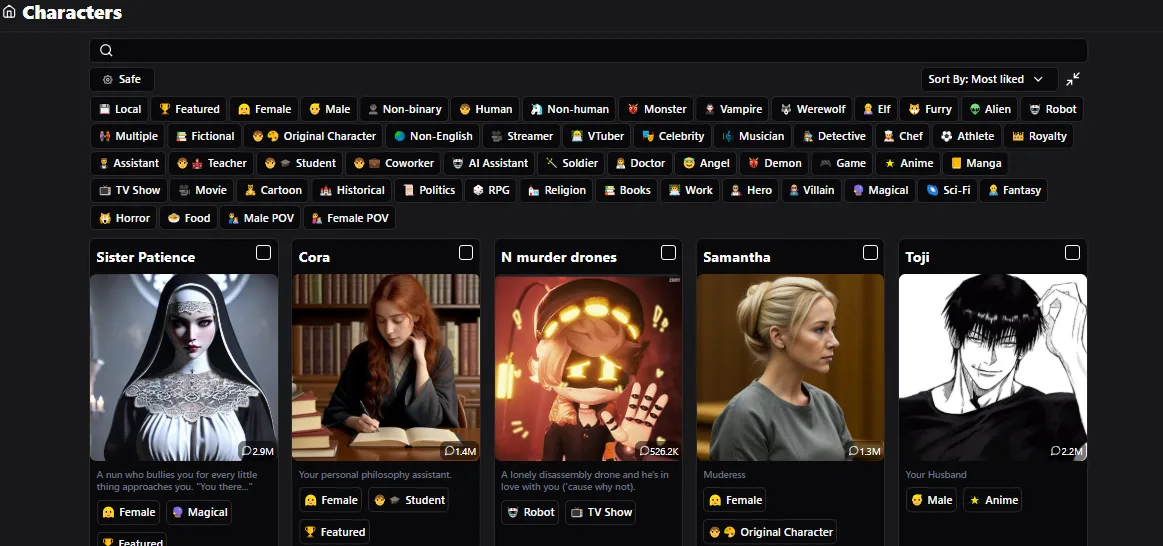
The Character Library is where most users begin. It features thousands of community-created characters across genres including fantasy, anime, horror, romance, sci-fi, and slice of life.
Built-in filters make it easy to find characters that match your interests, while each profile displays message counts and community ratings to help identify the most engaging options. Spending a few minutes exploring the library is worthwhile, as many of the top characters demonstrate the platform's writing potential.
2. Character Creation
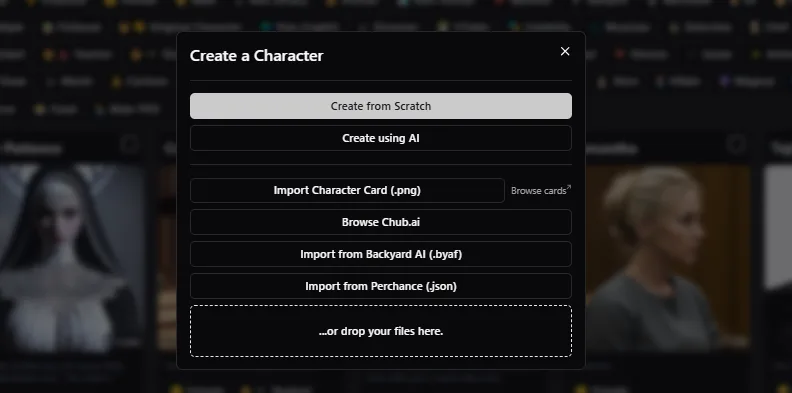
Creating your own characters is one of Hammer AI's strongest features, with several ways to get started.
Build from scratch: Create every aspect yourself, including personality, background, scenario, and example dialogue. The generous character limits allow for highly detailed personalities and complex story setups.
AI-assisted creation: Enter a name and brief description, and Hammer AI automatically generates a personality profile, scenario, and sample dialogue that you can customize.
Import character cards: Existing PNG character cards from other roleplay platforms can be imported without rebuilding them manually.
Backyard AI support: Characters saved in the BYAF format transfer directly into Hammer AI.
Perchance import: JSON character files from Perchance are also supported for easy migration.
A live dialogue preview lets you review how conversations will appear before saving, making it easier to fine-tune each character's personality and tone.
3. Group Chats
Hammer AI supports group conversations with up to 10 characters in a single chat. This feature is especially valuable for storytelling, allowing multiple characters to interact naturally within the same scene.
Instead of limiting conversations to one-on-one exchanges, it creates more dynamic dialogue and richer roleplay experiences.
4. Lorebooks and Memory
Long stories remain consistent thanks to two powerful memory systems.
The Lorebook stores important information about characters, locations, relationships, and world rules, automatically bringing relevant details into future conversations.
Alongside this, automatic conversation summaries preserve the broader context of ongoing chats, helping the AI remember previous events and maintain continuity during lengthy roleplay sessions.
5. Writing and Roleplay Tools
Hammer AI includes several creative tools that make storytelling more interactive.
Dice Rolls: Introduces chance into roleplay by allowing dice rolls that directly influence story outcomes.
Author Notes: Add private instructions to guide the AI without displaying them as dialogue.
Impersonate: Generates dialogue for your own character whenever you need inspiration.
Continue: Extends the AI's previous response without requiring a new prompt, helping scenes flow naturally.
Together, these tools give writers much greater control over pacing and narrative direction.
6. Advanced Model Controls
Unlike many AI chat platforms, Hammer AI gives users direct access to model settings. You can adjust parameters such as temperature, repetition penalty, and other sampling controls to make responses more creative, consistent, or focused.
While casual users may never change these settings, experienced writers can significantly improve output by fine-tuning the model's behavior.
7. AI Image Generation
Hammer AI includes a built-in AI image generator with two creation modes.
Text to Image: Describe the image using natural language and choose between realistic or anime styles, along with safe or mature content settings.
Character Builder: Create images using selectable appearance tags instead of writing detailed prompts, making consistent character designs much easier.
The platform supports 22 image models and can generate up to eight images in a single batch. Each image costs 10 credits.
One limitation is that custom characters created from scratch cannot generate images directly inside chats, instead, images must be created through the standalone image generator. Anime outputs remain consistently strong, while realistic characters may show some variation across multiple generations.
8. Voice Features
Hammer AI also offers text-to-speech with an extensive library of 746 voices across 34 languages. Characters can read responses aloud, adding another layer of immersion to conversations and stories.
Voice generation is available on every plan and costs 5 credits per audio clip, making it an optional premium feature rather than one tied to messaging limits.
9. Personal Workspace
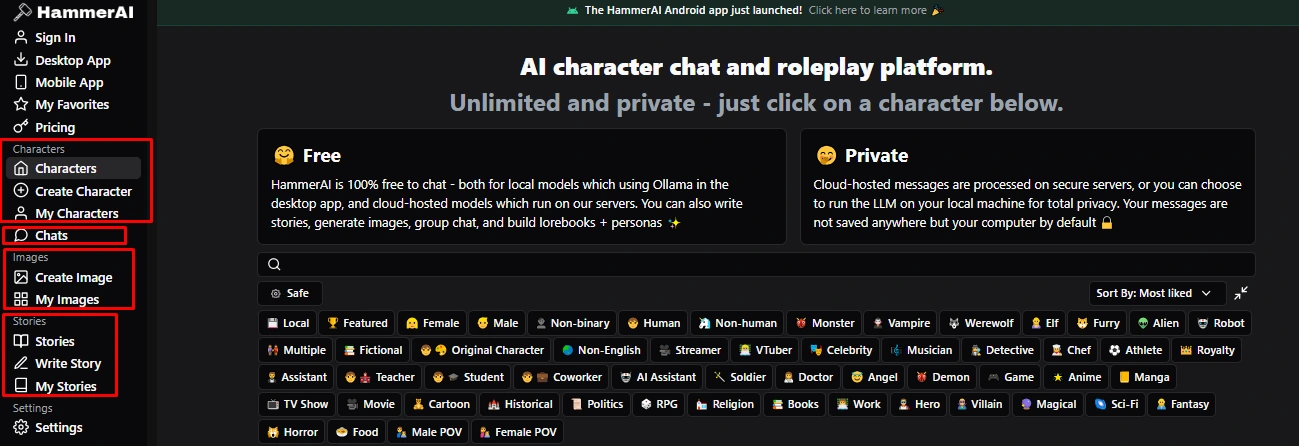
Everything you create is organized inside your personal library.
Chats store every conversation for future sessions.
My Characters keep all custom and imported characters.
My Images save generated artwork.
My Stories organize long-form writing projects.
These dedicated workspaces make Hammer AI well suited for ongoing creative projects, allowing you to return to stories and characters without losing progress.
Hammer AI for Story Writing
Story writing is where Hammer AI truly separates itself from most AI roleplay platforms. While many adult AI chat tools treat long-form writing as a secondary feature, Hammer AI is built with writers in mind, offering dedicated tools for creating, editing, and organizing stories from beginning to end.
1.Stories Library
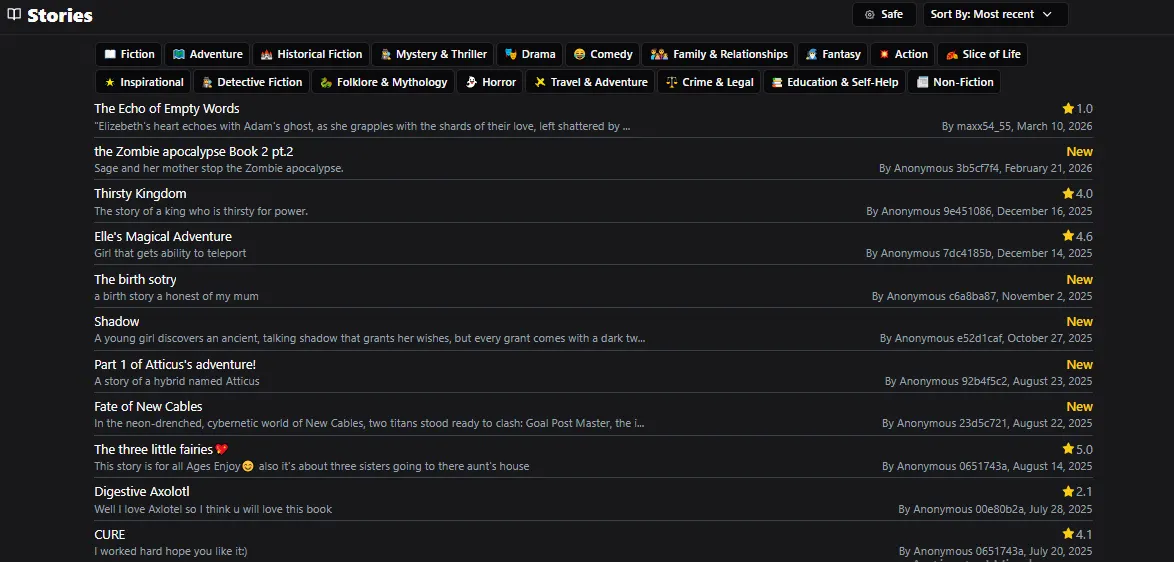
The Stories Library serves as a community hub for AI-assisted fiction. It features stories across a wide range of genres, including fantasy, horror, mystery, thriller, historical fiction, adventure, comedy, crime, detective fiction, and more.
Community ratings and comments help highlight the best stories, making it easy to discover quality content or see what the platform is capable of before starting your own project.
Once you've completed a story, you can also publish it for others to read. Few AI roleplay platforms provide a dedicated space like this, making it one of Hammer AI's standout features.
2. Write Story Tool
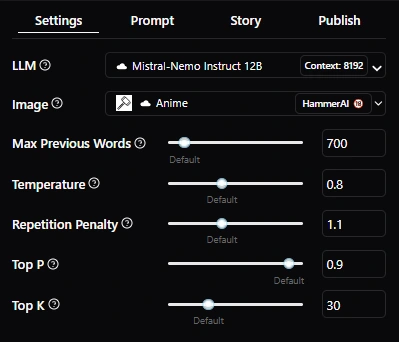
The Write Story tool is designed specifically for long-form fiction. Instead of generating isolated responses, it helps you build scenes, chapters, and complete narratives while keeping you in control of the direction.
You begin by defining the setting, characters, and opening scenario, then the AI expands the story one section at a time. As the narrative develops, you can adjust the pacing, refine dialogue, or redirect the plot whenever needed.
Every project is saved automatically, allowing you to continue writing whenever inspiration strikes.
Why It Works Well for Adult Fiction
Several features make Hammer AI particularly effective for writing mature stories.
Unrestricted creative writing: With mature content enabled, the AI follows your narrative naturally instead of interrupting scenes with unnecessary restrictions.
Support for long stories: Larger context windows on higher-tier plans help maintain consistency across lengthy chapters and ongoing storylines.
Reliable worldbuilding: Lorebooks preserve important character details, relationships, and world rules, reducing continuity errors as your story grows.
Greater creative control: Tools like Author Note and Continue let you guide the narrative without constantly rewriting sections yourself.
Ultimately, Hammer AI works best as a collaborative writing partner rather than a replacement for creativity.
It handles dialogue, descriptions, and scene progression effectively once you've established a clear direction, while still leaving the storytelling decisions in your hands.
Whether you're writing short roleplay scenarios or longer character-driven fiction, the platform provides the flexibility and tools needed to support the entire creative process.
Is Hammer AI Free
The free plan is real, and this is where many other reviews get it badly wrong. You will see claims that the free tier is just bait and that everything worthwhile sits behind a paywall. That is not accurate.
On Hammer AI, every plan gives you unlimited messages, including the free one, and the desktop app is free to run with no limits at all.
Here is what the free plan actually gives you.
Unlimited chat and story writing, with no message cap.
Access to every local model on the desktop app, run privately on your own machine.
The ability to proxy to any outside model through your own key, which is unusual for a free tier.
Two cloud models and an eight thousand token memory for the online version.
Automatic conversation memory with rolling summaries.
The private community Discord channel and a platform with no ads.
And here is what actually needs paid credits.
Generating images, which cost ten credits each.
Turning text into speech, which costs five credits each.
A larger memory and more cloud models, which come with the paid plans.
So the fair summary is that for chatting and writing, Hammer AI is free in a way very few adult tools are. You only pay if you want images, voice, or the bigger memory that helps with long stories.
If writing is your main goal, you can go a very long way without spending anything. To see how this compares with the rest of the field, our complete guide to AI smut writers lays out where every major tool sits on price and freedom.
Hammer AI NSFW and Uncensored Content
Adult content is the biggest reason people search for Hammer AI NSFW options, so here is exactly how the uncensored side works in 2026 and where its limits sit. There are two paths to unfiltered content, and they are not the same.
1. Uncensored on the Website
On the cloud version you turn on mature content in a simple setting, and the model stops holding back on explicit scenes. It keeps the tone you ask for and does not steer back to safe ground the way filtered apps do. For most users who just want open adult chat and writing without setup, this is enough on its own.
2. Fully Unfiltered on the Desktop App
The local models on the desktop app carry no filter at all. This is the most private and most open way to use Hammer AI, since nothing you write leaves your computer and nothing is checked against a content rule on a server. For writers who want total freedom and complete privacy for sensitive material, this is the setup to choose.
3. Adult Image Generation
The image generator has a mature mode as well, so you can create adult art in either the realistic or anime style, drawing from the same credit balance as everything else. As with all image tools in this category, a detailed prompt or a full set of tags gives a much better result than a vague one.
To set expectations clearly, here is what it will and will not do.
It will follow a wide range of adult and fetish themes when you set them out clearly.
It will hold an explicit tone across a long scene without softening it.
It will create adult images through the mature image mode.
It will not cross into anything illegal or harmful, and it still expects normal, legal adult use.
It will not read your mind, so a vague prompt gives a flat reply while a detailed one gives something far richer.
Compared with the large mainstream chat apps, the gap is wide for adult users. Those platforms wrap everything in heavy filters and water down a scene the moment it heats up. Hammer AI, once the mature setting is on, simply writes what you ask for.
If you are comparing the open tools against each other, our guide on which AI can write uncensored stories shows how Hammer AI measures up on freedom and quality.
How to Use Hammer AI
Getting started takes a couple of minutes on either version. Here is the quick path from zero to your first scene.
Choose your version. Use the website for the easy route, or the desktop app for full privacy. You can download the app from the Hammer AI desktop page.
Sign in or install. The website needs a quick sign in. The desktop app installs a local model for you through Ollama.
Pick a character or start a story. Browse the community library, import a character card, or create your own.
Turn on mature content if you want it. This is a single setting.
Set the scene. Describe where you are, who is present, and what is happening, so the model has something to work with.
Start writing. Chat, roleplay, or open the Write Story tool for long fiction, and use the Dice, Author Note, and Continue tools as you go.
The learning curve is short. You will get decent results on day one and much stronger ones once you learn to feed the model detail and lean on the memory and Lorebook features.
Good prompts make the biggest difference, so our set of NSFW AI prompts is a handy place to find openers that work well with tools like this.
Hammer AI Pricing and Plans
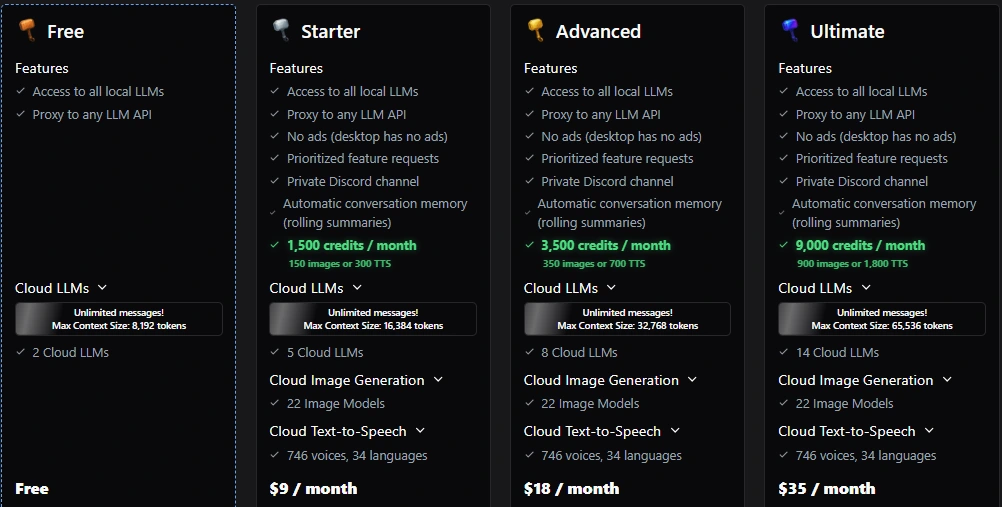
Pricing is clear and easy to follow. There is a free plan, three paid plans, and one time credit packs. The key point to remember is that messages are unlimited on every plan, and every plan includes the twenty two image models and the full library of seven hundred and forty six voices.
So you are really paying for a bigger memory, more cloud models, and a monthly pool of credits for images and voice.
Plan | Price a month | Monthly credits | Max memory | Cloud models |
Free | $0 | 0 | 8,192 tokens | 2 |
Starter | $9 | 1,500 | 16,384 tokens | 5 |
Advanced | $18 | 3,500 | 32,768 tokens | 8 |
Ultimate | $35 | 9,000 | 65,536 tokens | 14 |
Here is how we would think about each tier.
Free is for most writers. Unlimited messages, all local models on desktop, and rolling memory. Perfect if you write text and do not need images or voice.
Starter at $9 is for light image users. It adds fifteen hundred credits, which is about one hundred and fifty images or three hundred voice clips, plus a larger memory and more models.
Advanced at $18 is the middle ground. Thirty five hundred credits and a bigger memory suit people who mix regular images with longer stories.
Ultimate at $35 is for heavy users. The largest memory at sixty five thousand tokens, the most cloud models, and nine thousand credits a month, which is about nine hundred images or eighteen hundred voice clips.
If you would rather not pay monthly, there are one time credit packs. They never expire, so they suit people who only want images now and then.
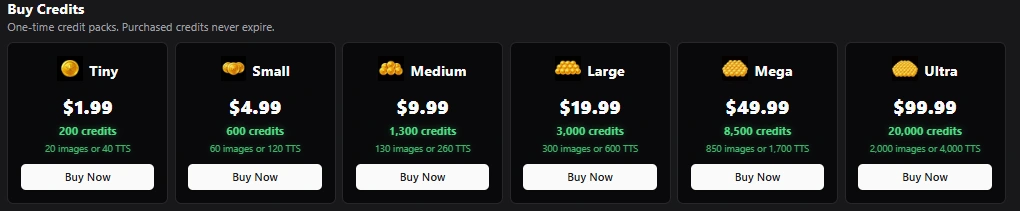
Pack | Price | Credits | Roughly |
Tiny | $1.99 | 200 | 20 images or 40 voice clips |
Small | $4.99 | 600 | 60 images or 120 voice clips |
Medium | $9.99 | 1,300 | 130 images or 260 voice clips |
Large | $19.99 | 3,000 | 300 images or 600 voice clips |
Mega | $49.99 | 8,500 | 850 images or 1,700 voice clips |
Ultra | $99.99 | 20,000 | 2,000 images or 4,000 voice clips |
Each image costs ten credits and each voice clip costs five, so planning your spend is easy. One point to know before you buy. The payment system does not offer refunds, so treat every purchase as final.
For pure writing you may never need to pay at all, which is what keeps Hammer AI one of the better value tools in this space.
Tips to Get the Best Results from Hammer AI
Hammer AI gives back what you put in. The difference between a flat reply and a scene that grips you usually comes down to setup. These are the habits that made the biggest difference in our testing.
Give the model a full scene. A short line gives a short reply. Describe the setting, the people, the mood, and what just happened, and the writing gets far richer.
Use the desktop app for anything sensitive. Local models run offline with no filter, so your most private stories never leave your machine.
Pick the right model for the job. The cloud models differ in tone and length. Try a few and settle on the one that suits your style.
Fill in a Lorebook early. Add your characters, places, and rules before a long story so the model stays consistent as the plot grows.
Raise your memory for long pieces. If a story keeps forgetting earlier details, the larger memory on a paid plan or on the desktop app fixes most of it.
Lean on Author Note to steer. When a scene drifts, a short note nudges it back without you having to rewrite anything.
None of this is complicated, and most of it becomes second nature within a session or two.
If you want to understand what is happening behind the scenes, our breakdown of how AI smut generators actually work explains the mechanics of these tools in plain terms.
Real Experience, What Users and Trust Platforms Say
Sales pages tell you what a company wants you to hear. Real trust comes from outside sources, so here is what the independent signals say about Hammer AI, including one warning that could stop you from installing the wrong app.
Scamadviser Trust Score
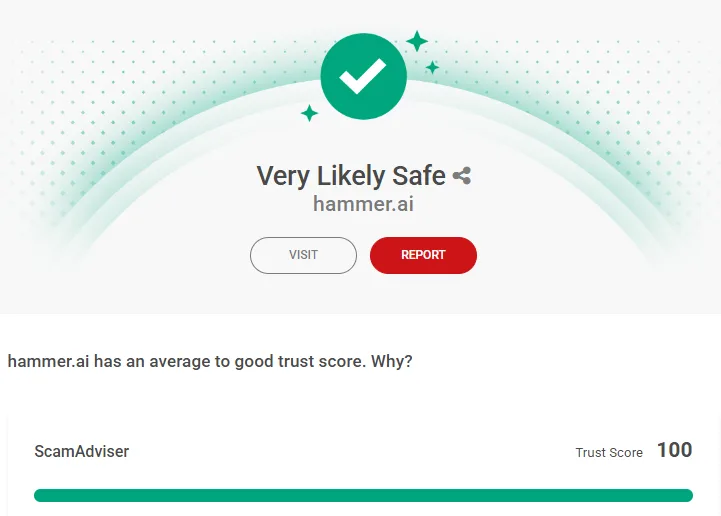
Hammer AI performs exceptionally well on Scamadviser, earning a Trust Score of 100/100. The website is classified as legitimate and safe to use, with no significant indicators commonly associated with scam websites.
One reason for this strong rating is the domain's long registration history and established online presence. Scam websites are typically created for short-term use, whereas Hammer AI has maintained an active and credible web presence over time.
While no third-party rating should replace your own judgment, a perfect Scamadviser score is a strong indicator that the official website is genuine.
Google Play Store

The official Hammer AI Android app is published under the developer name Hammer AI and has surpassed 5,000+ downloads on Google Play. It supports in-app purchases for premium features while allowing users to access the same account, characters, and conversations available through the web version.
For security reasons, it's always best to install the app directly from the official Google Play listing rather than downloading APK files from third-party websites.
Apple App Store
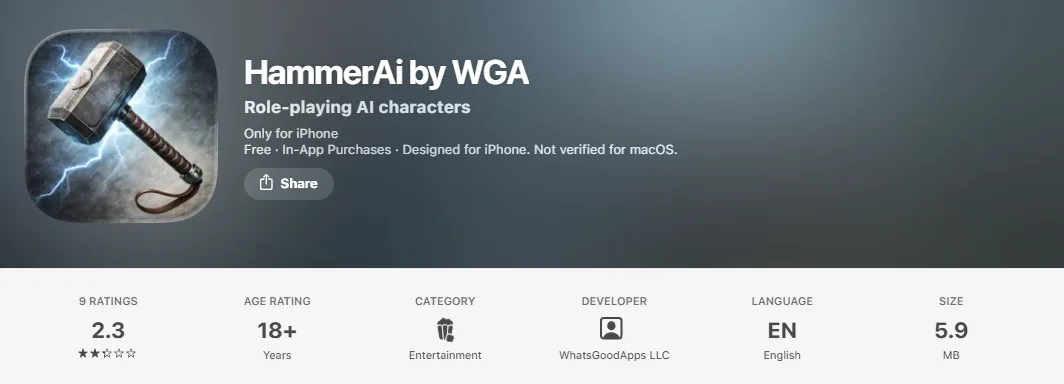
iPhone users should be more cautious. Searching the App Store currently shows an app called "HammerAi by WGA," published by WhatsGoodApps LLC. At the time of our review, it holds a 2.3 out of 5 rating based on only 9 reviews, carries an 18+ age rating, and offers in-app purchases through a weekly subscription model.
These details do not match the official Hammer AI platform. The official website only lists Web, Windows, macOS, and Linux as supported platforms and does not reference this iOS application. The developer name, pricing model, and feature descriptions also differ significantly from the official product.
For that reason, we do not recommend downloading this App Store listing. If you're using an iPhone, the safest option is to access Hammer AI through your mobile browser.
Reddit and Community Feedback
User discussions across Reddit paint a largely positive picture of Hammer AI. Most users appreciate its uncensored writing capabilities, privacy-focused desktop application, and flexibility for roleplay and long-form storytelling.
The most common criticism involves memory limitations in the browser version, which can occasionally reset conversations unless you're using the desktop app or higher-tier plans with expanded context.
Hammer AI also does not currently have a Trustpilot profile, so Reddit and other community forums remain the primary source of user feedback. Overall, community sentiment aligns closely with our own testing: Hammer AI is a reliable and feature-rich platform with a few usability limitations, but it delivers one of the strongest writing experiences available in its category.
Is Hammer AI Safe and Legit?
Based on our testing and independent verification, Hammer AI is a legitimate platform. From a privacy standpoint, it offers stronger protection than many AI roleplay tools thanks to its desktop application.
Unlike cloud-only services, the desktop version runs AI models locally through Ollama, allowing your chats and stories to stay entirely on your own computer. That means your content doesn't need to be processed on external servers, making it one of the most privacy-focused options available for adult writing.
Why We Consider Hammer AI Safe
Private local mode: The desktop app runs completely offline, keeping your conversations and stories on your own device.
Strong reputation: The official website holds a 100/100 Trust Score on Scamadviser, indicating a highly trusted and legitimate service.
Transparent pricing: Every plan includes unlimited text messages, and we found no misleading free trials or hidden subscription charges.
Established platform: The domain has been active for several years, which is generally a positive indicator of a genuine, long-term product.
Things to Keep in Mind
Browser sessions: The web version may not preserve conversations if you close your browser unexpectedly, so save important work regularly.
Credit purchases: Credits used for images and voice features are generally non-refundable, so purchase only what you expect to use.
Download carefully: Always use the official Hammer AI website or the verified Google Play listing. Avoid unofficial downloads and the unrelated iPhone app listing, as they are not associated with the official platform.
Overall, Hammer AI is a trustworthy choice for users who value privacy, creative freedom, and long-form writing. Its local desktop mode remains one of its biggest advantages and is a feature that very few competing AI roleplay platforms currently offer.
Pros and Cons of Hammer AI
Like any AI writing platform, Hammer AI has clear strengths and a few limitations. After testing both the free and paid versions, here's what stood out.
Pros | Cons |
Unlimited text messaging across the free and paid plans, with credits only required for images and voice. | Basic interface that feels more functional than polished and has a slight learning curve. |
Uncensored writing experience with mature mode on the web and completely unrestricted local AI models. | Browser sessions may not be saved automatically, so important stories should be saved regularly. |
Privacy-focused desktop app runs AI models locally on Windows, macOS, and Linux, keeping conversations on your device. | Custom characters cannot generate images directly inside chats and must use the standalone image generator. |
Excellent for long-form storytelling with a dedicated Stories Library, Write Story tool, and strong memory support. | Realistic image consistency can vary, with faces occasionally changing between generations. |
Advanced character creation with AI generation, manual creation, and imports from multiple roleplay platforms. | Very long stories can occasionally lose context, although this is common among AI writing tools. |
Powerful writing tools including Lorebooks, Group Chats, Dice, Author Notes, Continue, and Impersonate. | AI image generation and voice features consume credits, even on paid plans. |
Wide AI model selection, supporting up to 14 cloud models plus locally installed models through Ollama. | An unofficial iPhone app exists, so users should download Hammer AI only from the official website or verified Google Play listing. |
Transparent pricing with useful free access, flexible subscriptions, and credits that do not expire. | No Trustpilot profile, so most user feedback comes from Reddit and other community discussions rather than review platforms. |
Use Hammer AI if any of these sound like you.
You want to write adult stories or roleplay with full creative freedom.
You care about privacy and like the idea of running everything offline.
You want a genuinely free tool for chat and writing, with real depth.
Look elsewhere if any of these are true.
You want a slick, polished app with a partner who messages you first.
You want finished stories to read without any setup.
You need flawless long plotting with no wandering at all.
Our Verdict on the Pros and Cons
Hammer AI excels as a privacy-focused AI writing platform built for roleplay and long-form storytelling rather than casual chatting. Its local desktop mode, uncensored writing capabilities, and extensive creative tools make it one of the strongest free options in its category.
Most of its drawbacks relate to usability and image features rather than the quality of the writing experience itself.
Hammer AI Alternatives
Hammer AI is an excellent choice for creative writing and roleplay, but it isn't the perfect fit for everyone. Whether you're looking for ready-made stories, fast AI conversations, or advanced writing tools, there are several strong alternatives worth considering.
Tool | Best For | Free Option | Uncensored | Long-Form Writing |
SmutFinder | Reading and generating ready-made adult stories | Yes | Yes | Moderate |
Hammer AI | Writers who value creative freedom and privacy | Yes (Unlimited Messages) | Yes | Excellent |
SpicyChat | Fast AI roleplay with a large character library | Yes (Limited) | Yes | Basic |
Dedicated AI Writers | Authors working on novels and long projects | Some | Varies | Excellent |
SmutFinder: Best for AI Smut and Erotic Stories
If your goal is to enjoy high-quality AI smut stories without spending time creating characters or building prompts, SmutFinder is the better choice.
Instead of acting as a writing platform, it focuses on delivering polished stories while also letting you generate new content on demand. It's ideal for readers who want instant results rather than a collaborative writing experience.
SpicyChat: Best for Fast Roleplay
If you prefer jumping straight into conversations with a large community-created character library, SpicyChat is a strong alternative. It prioritizes quick, uncensored roleplay over long-form storytelling, making it better suited for casual chat sessions than detailed fiction.
Our SpicyChat AI review explores its features, pricing, and overall experience in more detail.
Dedicated AI Writers: Best for Authors
For users working on novels, serialized fiction, or other long-form writing projects, dedicated AI writing platforms provide stronger outlining, editing, export options, and story management tools than general roleplay apps. They typically require a subscription but offer more structure for serious writers.
We compare the leading options in our guide to the best NSFW AI writers.
Which Alternative Should You Choose
Choose Hammer AI if you want maximum creative freedom, privacy, and powerful roleplay tools.
Pick SmutFinder if you'd rather read or instantly generate complete adult stories.
If fast character chats are your priority, SpicyChat is a better fit, while dedicated AI writing platforms remain the strongest choice for authors planning longer, book-length projects.
Final Verdict
Our overall score is a 4 out of 5. Hammer AI is a genuine, private, and generous tool for people who want to write. It is one of the best free tools available for adult roleplay and story writing, as long as you know what it is and what it is not. It is not a glossy companion app with a fake partner.
It is a proper writing platform with an uncensored setting, a private offline mode, deep character creation, group chats, Lorebooks, and a dedicated Stories tool, and you can use all of it without paying a cent.
For writers who enjoy building a scene and shaping a plot, that combination is very hard to match at the price.
If you would rather skip the setup and simply read or generate finished adult stories, SmutFinder is built for that from the ground up. Either way, you now know exactly what Hammer AI offers, what it costs, and how to use it safely
Frequently Asked Questions
1. Is Hammer AI completely free?
Yes. Hammer AI offers a free plan with unlimited text messages, making it one of the few AI roleplay platforms without chat limits. Credits are only required if you want to generate AI images or use text-to-speech features.
2. Is Hammer AI really uncensored?
Yes. You can enable mature content on the web version, while the desktop app running local AI models has no built-in content filter. This gives users much more freedom for creative writing and roleplay.
3. Can Hammer AI write long stories?
Yes. Hammer AI includes a dedicated Write Story tool, a Stories Library, Lorebooks, and memory features that help maintain consistency across longer stories and roleplay sessions.
4. Is Hammer AI safe and legitimate?
Yes. The official Hammer AI website has a 100/100 Trust Score on Scamadviser and has been active for several years. For the safest experience, always download the software from the official website or verified Google Play listing.
5. Does Hammer AI work offline?
Yes. The desktop application supports offline use by running AI models locally through Ollama. Once everything is installed, your conversations can remain entirely on your own computer.
6. Can I create my own AI characters?
Yes. You can create characters from scratch, generate them with AI, or import character cards from compatible platforms. Hammer AI also supports detailed personality settings and custom scenarios.
7. Does Hammer AI generate AI images?
Yes. Hammer AI includes a built-in image generator with both Text-to-Image and Character Builder modes. Image generation uses credits and supports realistic as well as anime art styles.
8. Is there an official Hammer AI mobile app?
Yes, for Android. The official app is available on Google Play. For iPhone users, the safest option is currently to use Hammer AI through a web browser rather than the unofficial App Store listing.
9. Which devices support Hammer AI?
Hammer AI works in any modern web browser and also offers desktop applications for Windows, macOS, and Linux. The desktop version provides the best privacy because it supports local AI models.
10. Who should use Hammer AI?
Hammer AI is ideal for writers, roleplayers, and anyone who wants an uncensored AI platform for long-form storytelling. If your priority is creative freedom, privacy, and detailed character creation, it is one of the strongest options currently available.
Marcus Ryder
Reviews and Alternatives Editor
Marcus Ryder is an author on SmutFinder and reviews the AI tools people use to write stories and roleplay. He never covers a tool until he has used it himself, so he signs up, runs real prompts, and checks the pricing before he says anything. His reviews are honest about what a tool does well and where it falls short. He also writes the guides that point readers to better alternatives, and compares tools when two of them look the same on paper. Years of reviewing software and tech mean he can tell a real product from a good sales page.
Ready to start your writing journey?
Join thousands of writers who are already creating amazing stories with our AI-powered platform.