Squibler Review 2026: Best AI Book Writing Software or Just Hype?
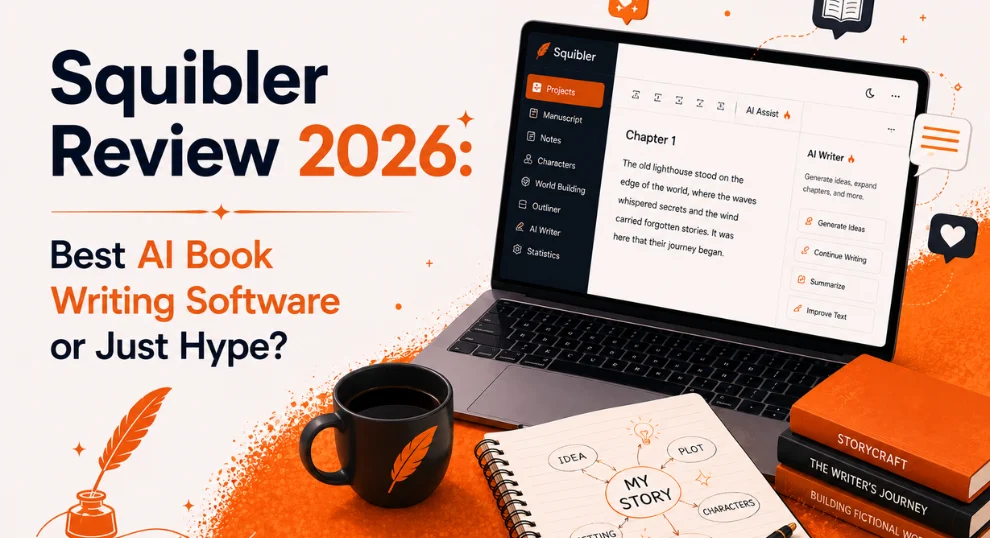
Squibler promises to turn a single sentence into a 300 page book. It also carries a 2.3 out of 5 rating on Trustpilot, where most reviewers leave a single star. Both of those things are true at the same time, and the gap between them is exactly what this Squibler review is here to explain.
On paper, the Squibler AI looks impressive. It has an attractive website, a clean editor, and a feature list that reads beautifully.
In practice, a large share of reviewers describe strikingly similar experiences involving unexpected charges, difficult cancellations, and lost work. A polished pitch and a polished product are not always the same thing, and separating the two is the entire point of this review.
This Squibler review is designed to give you the complete and honest picture. We examined real user feedback from Trustpilot, Reddit, and Capterra, alongside several independent hands-on tests, then measured all of it against the actual feature set and the current 2026 pricing.
By the time you finish reading, you will know precisely who Squibler suits, who should avoid it, and whether it truly earns the title of best AI book writing software or sits closer to hype.
Squibler AI
Squibler is ideal for structured, long-form writing with excellent planning tools and a generous free plan. The prose is competent rather than exceptional and weakens over long fiction, and the billing and cancellation complaints are too consistent to ignore.
| Best for | Beginner authors, non-fiction writers, screenwriters, and anyone who wants planning and drafting combined in one dashboard |
| Reconsider if | You require publication ready fiction prose, prefer a clean minimalist editor, or feel uneasy about auto renewing subscriptions |
| One firm rule | Treat the free plan as your genuine trial, set a calendar reminder before any paid period begins, and read the billing terms carefully |
Writers exploring AI-powered adult fiction can also compare niche platforms featured on SmutFinder before choosing.
How We Evaluated This Squibler Review
Every AI writing platform looks impressive on its landing page, but real value only becomes clear after looking beyond the marketing.
For this Squibler review, we combined hands-on testing with independent user feedback to understand how the platform performs in everyday writing scenarios.
Our evaluation focused on the areas that matter most to writers:
AI writing quality for fiction and non-fiction projects
Book outlining, templates, and project organization tools
Ease of use for beginners and experienced authors
Pricing, AI credit limits, and subscription value
User reviews from Trustpilot, Reddit, and Capterra
Billing practices, cancellation experience, and reported issues
Recent features, updates, and long-form writing capabilities
Rather than relying on promotional claims, we compared Squibler's advertised features with real user experiences and practical testing. The goal was to identify where the platform genuinely helps writers and where expectations should be more realistic.
Why You Can Trust This Guide
Our reviews are written independently and are not sponsored by the companies we cover. We research each platform using official documentation, public pricing, feature updates, and feedback from real users across multiple trusted sources before reaching a conclusion.
For this review, we examined Squibler's website, tested its available features, reviewed discussions from active writers, and compared recurring feedback across different review platforms. Instead of focusing only on strengths, we also highlight common complaints, limitations, and situations where another writing tool may be a better fit.
Our goal is simple: provide practical, unbiased information that helps writers make informed decisions based on real experiences rather than marketing promises.
What Is Squibler?
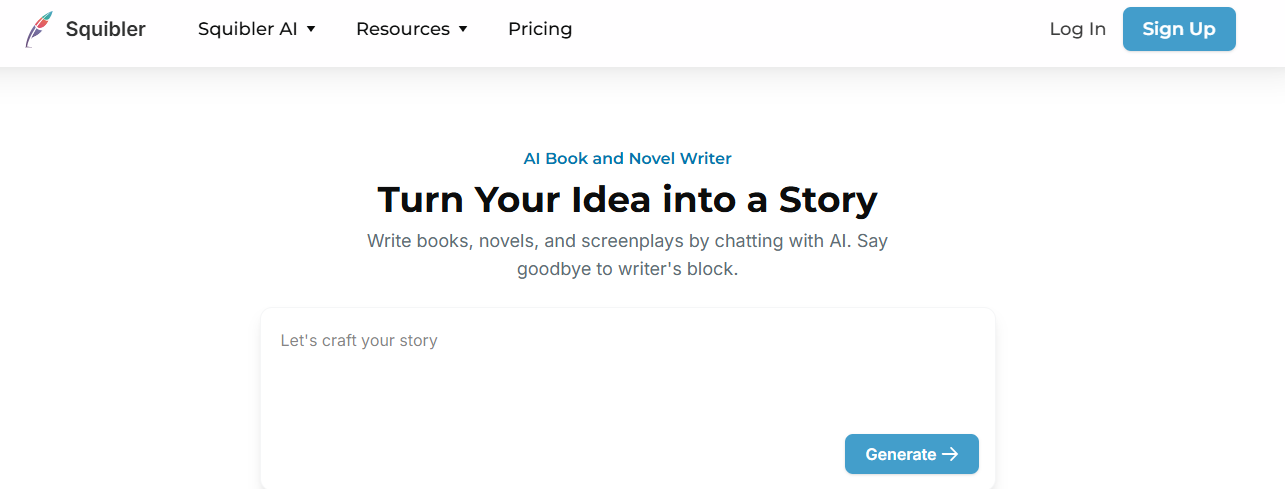
Squibler is a web based AI writing platform built for people working on long form projects, including novels, non-fiction books, screenplays, scripts, and serialized fiction.
Rather than presenting you with a blank document, the Squibler AI book writer provides a framework. You select a project type, answer a few setup questions, and the tool produces an outline or a full draft that you then refine.
The Company Behind Squibler AI
The company has a longer history than most AI writing startups. Squibler was founded in 2018 by Joshua Fechter, and it has remained privately held and bootstrapped, taking no outside funding.
The Squibler AI story generator, which is the part most people search for today, launched in late 2023 and has been expanded steadily since then. That track record is one reason the platform shows up so often in best AI book writing software roundups.
How Squibler AI Is Different From Other Writing Tools
The most important point to understand about Squibler is its underlying philosophy. The majority of AI writing tools are prose first. They exist primarily to generate the best possible sentence on demand.
Squibler takes the opposite approach. It is structure first. Its central selling point is that the Squibler AI keeps your story elements, your chapters, your characters, and your plot points organized while the AI assists with drafting.
This reliance on generative artificial intelligence to produce original text is what places Squibler in the same broad category as the wave of writing assistants that have emerged since 2023. That single difference in approach explains nearly everything people praise and criticize about it.
Who Squibler AI Is Built For
For writers who dislike switching between a separate outlining app, a document editor, and a chatbot window, this all in one Squibler AI writing tool is the entire appeal.
For writers who simply want a quiet space to type, the dashboard of features can feel like a great deal of activity before a single word is written.
Neither response is incorrect, and which one applies to you is worth identifying early in this Squibler review.
Squibler AI Traffic and Search Visibility
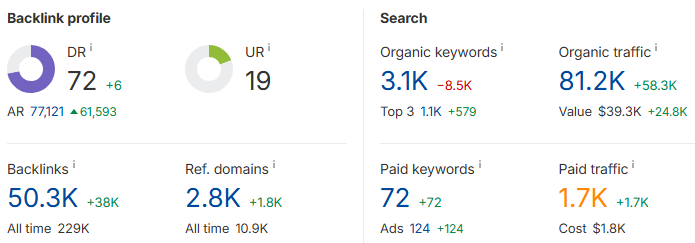
According to Ahrefs data, squibler.io attracts roughly 73,000 organic search visitors every month, with an estimated traffic value of around 36,000 dollars.
The site ranks for more than 3,100 organic keywords, and over a thousand of those sit in the top three positions of Google. In plain terms, a large number of people are actively searching for Squibler and the AI writing topics it covers, and the platform is winning meaningful visibility for them.
Its authority profile backs this up. Squibler holds a Domain Rating of 72, which is high for a tool in this space, supported by a backlink profile of more than 50,000 links from around 2,800 referring domains.
A score like that is not something a brand new or low quality site achieves quickly. It signals years of steady growth and a reputation strong enough that other websites consistently link back to it.
Squibler AI Visibility in AI Search and Chatbots
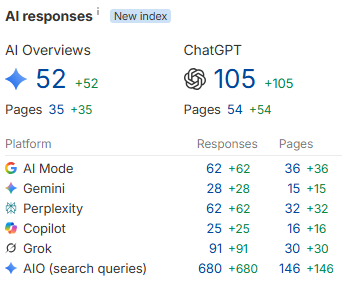
The more interesting story in 2026 is where Squibler appears beyond traditional search. The platform is increasingly cited inside AI powered answers, showing up across Google AI Overviews, ChatGPT, Perplexity, Gemini, Copilot, and Grok when users ask about AI book writing software.
As more readers research tools through AI assistants rather than classic search results, that presence matters, because it shapes the recommendations people receive before they ever visit a website.
The takeaway from all of this is straightforward. Whatever its flaws, Squibler is a real, widely used, and well established AI writing tool with serious search authority and growing visibility in AI search engines. That popularity does not guarantee a good experience for every user, as the reviews later in this article make clear, but it does confirm you are evaluating a serious product rather than an obscure gamble.
How Squibler AI Actually Works
When you create a Squibler account, the platform immediately attempts to solve the blank page problem for you. The Squibler AI book generator can produce a draft of up to roughly 300 pages in a single pass, but the quality depends on how you set it up.
Here is how the Squibler workflow actually runs, step by step.
Choose your project type. You pick whether you want to write a book, a screenplay, a script, or a short story, or simply explore the editor with no commitment. This tells the Squibler AI which template and structure to build around.
Describe your idea in at least 20 words. Squibler uses this description as the seed for everything it generates, so a thin one line prompt produces generic output while a detailed description produces noticeably tighter results.
Generate an outline or a full manuscript. You decide whether you want the Squibler AI story generator to create a chapter outline first or draft the entire manuscript in one pass, up to roughly 300 pages.
Land inside the editor. Squibler drops you into a workspace split into clear zones, with your chapters on the left, your writing space in the center, and the Smart Writer AI assistant in the right sidebar.
Import an existing draft if you have one. If you already started elsewhere, you can import your work during setup and continue inside Squibler instead of starting over.
Follow the built in tutorial. Squibler walks you through the main features, which most testers found genuinely helpful since a few of the more useful tools are tucked away and easy to overlook.
Why the 20 Word Minimum Matters
That 20 word minimum is more significant than it appears. The Squibler AI uses your description as the seed for everything it generates.
A single thin sentence produces generic, forgettable output, while a description with genuine context about tone, characters, and setting produces noticeably tighter results.
This is the first lesson most new users learn, and it is worth internalizing before you judge the tool's quality.
First Impressions of the Squibler Dashboard
The first thing nearly every tester observes is that Squibler is attempting to do a great deal. When you open it, you are not looking at a blank document.
You are looking at a project dashboard for your manuscript, with planning, chapters, characters, templates, progress tracking, and the Squibler AI all sharing the same workspace.
For the right writer, this is exactly the appeal. It feels less like a text editor and more like mission control for a book. For others, it can feel like a wall of moving parts standing between them and the simple act of writing.
The dashboard and editor themselves are described as minimalist and easy to navigate, which softens the learning curve considerably. The interface is fairly standard, so anyone who has used a word processor will feel comfortable quickly, with the additional depth available when it is wanted.
Squibler's Core Features
Squibler bundles a surprising number of tools into a single workspace. Some are genuinely useful and well executed. Others are simply the same features appearing in nearly every AI writing application this year.
Here is what actually matters, examined piece by piece.
1. Smart Writer, the Squibler AI Assistant
Smart Writer is the core of the product. It is the AI assistant in the right sidebar that brainstorms, drafts, rewrites, and expands your text. It operates in two main modes, and understanding the difference between them prevents a good deal of frustration.
In Auto mode, Smart Writer simply continues whatever you have already written. It requires at least 20 words ahead of your cursor to function, then it picks up the thread and continues. In Guided mode, you take control. You specify what you want it to write about, set a creativity level on a slider, choose a tone, and select a point of view.
Guided mode is where Squibler earns its keep. The more context you provide, the better the resulting scene. A thin prompt such as writing a tense courtroom scene yields vague, characterless filler.
A richer prompt that includes the names, the stakes, and the mood produces something you can genuinely build upon. The underlying model has been described as drawn from open source AI, which is worth noting for anyone who wants full transparency about what is powering their drafts.
The quality of your prompt matters as much as the tool itself, and this collection of effective prompts for AI story generation demonstrates the level of detail that consistently produces stronger output across any platform.
2. Templates and the Planning Board
This is Squibler's true strength, the element reviewers consistently praise even when they criticize everything else. The template library covers far more than novels.
You will find layouts for screenplays, short stories, non-fiction, and various structured project types, so you are not forced into a one size fits all setup.
The planning board, sometimes called the corkboard, is where the organization genuinely shines. You can break a book into chapters and scenes, then drag and drop them to reorder the entire structure.
If you have ever lost track of where a scene went, forgotten a subplot, or struggled to reshuffle chapters in a large manuscript, this view makes the work dramatically easier. There is no copy and paste chaos, simply clean rearranging.
3. The Book Proposal Workflow
Added more recently, the book proposal step functions as a pre-flight checklist for your story. Before you ask Smart Writer to draft chapters, you lock in your genre, tone, point of view, and key plot points.
The reason this helps is consistency. When your inputs are aligned in advance, the AI output tends to stay on track rather than wandering into random detours with your characters or themes.
In simple terms, it reduces why this suddenly feels like a different book problem that frequently affects long AI drafts. This single feature does more to improve output quality than any amount of regenerating individual passages.
4. Ask Squibler Chat Tooltip
One of the 2026 additions is a small, context aware chat assistant built directly into the writing dashboard.
Instead of leaving your document, you can ask it to rewrite a passage, generate dialogue, or brainstorm a scene on the spot. It is a quality of life feature rather than a headline one, but it reduces the tab switching that slows writers down.
5. AI Visualize
Squibler also generates images. AI Visualize lets you create visuals for storyboarding scenes or for marketing style artwork. Screenwriters tend to benefit most, since the ability to see a location or a key character moment before committing to full dialogue can be useful. For novelists, it functions more as a pleasant extra than a core tool.
6. Elements, Goals, and Export
Several smaller features complete the platform. The Elements tool lets you create entries for characters, locations, and objects, storing key details so you can reference them quickly while writing.
Goal tracking lets you set daily word targets to maintain momentum. Version history and a clean night mode are included as well.
On export, Squibler covers the formats that matter. You can push your work out to PDF, DOCX, and Kindle ready files, which makes it practical for both editing handoffs and self publishing. Your projects are stored on cloud infrastructure, so your work saves as you go.
For a broader understanding of how AI generation tools function beneath the surface, this behind the scenes explainer on how AI generators work offers a clear, jargon free overview that applies to Squibler as much as to any other platform.
Squibler AI Writing Quality, an Honest Assessment
This is the section most Squibler reviews quietly skip, and it is the one that matters most if you are paying for an AI book writer. The marketing states that the tool generates full manuscripts. It does. The genuine question is whether those manuscripts are any good.
The honest answer, drawn from multiple hands-on tests, is that it depends heavily on what you are writing. There is a clear divide between fiction and non-fiction, and pretending otherwise would do you a disservice.
Squibler AI for Fiction Writing
For fiction, the pattern is consistent across testers. The Squibler AI can certainly generate a full book in one pass, and the opening typically features a decent hook. Then the weaknesses emerge. The longer the manuscript runs, the more visible the AI fingerprints become, with prose that leans on telling rather than showing, repeats stock phrases, thins out the dialogue, and drifts between points of view without warning.
The most detailed firsthand account of this comes from a published author who tested Squibler with a full murder mystery, which we cover in depth in the Squibler reviews section below. The takeaway is that the Squibler AI story generator is best treated as a fast first draft engine rather than a finished prose machine.
The fair counterpoint runs through most honest Squibler reviews. If you struggle to begin, or you wish you had a partner to brainstorm with, the Squibler AI can serve as a real resource. The most reliable way to use it is as a drafting partner that defeats the blank page, not a ghostwriter that hands you a finished novel.
Whether AI can write convincing fiction at all is a live debate, and this discussion of whether AI can write genuinely engaging creative content covers the same tension that Squibler users run into firsthand.
Squibler AI for Non-Fiction Writing
For non-fiction, the picture improves. Independent testers found Squibler noticeably more helpful here. The AI understands logical structure, organizes sections sensibly, and produces paragraphs that flow naturally.
The trade off is that the ideas tend to be generic and the tone requires human warmth added back in. The underlying structure, however, is sound. For handbooks, guides, and structured non-fiction where organization carries most of the weight, Squibler can save meaningful time on the first draft.
One transparency gap is worth flagging. Squibler does not clearly state which language model powers its outputs. There is also no brand voice or tone customization at the level you would find in some marketing focused tools.
If precise voice control is important to you, expect to perform that shaping yourself after generation rather than relying on the platform to deliver it automatically.
Best Use Cases Where Squibler AI Genuinely Shines
Setting raw prose quality aside, there are specific tasks Squibler performs well, and they deserve to be named clearly.
The first is defeating the blank page. If you struggle to start, the ability to type a short idea and instantly receive an outline or rough draft to react to is of real value. Editing something is far easier than creating from nothing, and Squibler excels at handing you that something.
The second is structured project management. For a book length project where you are juggling characters, scenes, subplots, and chapters, the ability to break everything into pieces and rearrange them by dragging and dropping is a meaningful time saver. Writers who have lost a scene or forgotten a thread inside a large document tend to appreciate this most.
The third is versatility across formats. You are not confined to novels. The template library spans screenplays, scripts, short stories, and various non-fiction projects, so the same workspace handles very different kinds of writing. Screenwriters in particular receive a useful combination of script templates, a planning view, and the visualize feature for picturing scenes before committing to dialogue.
The fourth is rapid idea testing. If you want to see what a storyline could look like before committing weeks to it, Squibler produces a quick draft you can evaluate, which makes it useful for exploring concepts and discarding those that do not hold up. Treated as a prototyping tool for stories rather than a final draft generator, it performs the role well.
Squibler Pricing in 2026
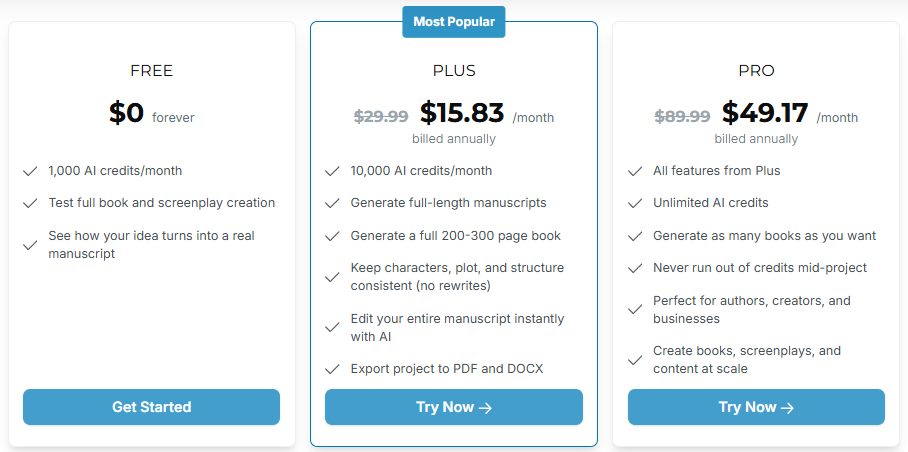
This is where many older Squibler reviews get it wrong, so one detail deserves close attention. Squibler now prices on AI credits rather than word counts. A number of guides still reference a 6,000 words per month free plan.
The current Squibler pricing structure is built around monthly credits instead, and that changes how you should compare it to other AI book writing tools.
There are three Squibler plans, namely Free, Plus, and Pro. The paid plans are less expensive when billed annually, with the company advertising a 45 percent saving over monthly billing.
Pricing has become a more important consideration as adoption rises, and according to Pew Research Center data published in 2026, about half of US adults now report using AI chatbots, up from roughly a third in 2024, which means writers have more options and more reason to weigh value carefully.
Here is the current Squibler pricing breakdown.
Plan | Annual (per month) | Monthly | AI Credits | Who It Is For |
Free | $0 forever | $0 forever | 1,000 / month | Testing the full workflow before paying |
Plus (most popular) | $15.83 | $29.99 | 10,000 / month | Full length manuscripts, most active writers |
Pro | $49.17 | $89.99 | Unlimited | High volume authors, creators, and businesses |
Squibler Free Plan
The Squibler free plan is genuinely useful and the correct place to start. With 1,000 credits per month, you can test full book and screenplay creation and observe how your idea turns into a real manuscript.
It is enough to judge the workflow, the output quality, and whether the Squibler AI suits the way you write before you spend anything.
Squibler Plus Plan
Plus is the tier most writers settle on. At $15.83 per month billed annually, it unlocks full length manuscript generation, the ability to produce a 200 to 300 page book, consistency tools that keep characters and plot intact without rewrites, instant AI editing across your entire manuscript, and PDF plus DOCX export.
Squibler Pro Plan
Pro removes the credit ceiling entirely. At $49.17 per month annually, you receive unlimited credits, unlimited books, and no risk of running dry in the middle of a project.
It is aimed squarely at people producing books and content at scale rather than the occasional author.
A Word of Caution on Squibler Billing
The annual prices appear friendly, but they are billed as a single lump sum. The Plus annual plan works out to roughly $190 charged at once, and the Pro annual plan lands near $590.
That detail becomes very important in the next section, because the single largest complaint in Squibler reviews concerns what happens at that billing moment.
Before handing over payment details to any writing platform, it is also worth understanding what separates a trustworthy service from a risky one, which this overview of what makes an AI writing platform safe to use lays out clearly.
Is Squibler Legit and Safe to Use
This is the question most reviews bury or ignore entirely. Squibler is a real, established company with a real product, so in the basic sense, yes, it is legitimate.
However, being legitimate and being trustworthy with your payment details are two different questions, and the public record raises genuine concerns about the second.
The short answer is that Squibler is safe in the sense that it is not a scam and many writers use it without incident, but its billing and cancellation practices have generated enough consistent complaints that you should treat the subscription with real care. The detailed evidence behind that conclusion comes from the user reviews below, drawn from every major review platform.
Squibler User Reviews From Real Customers
To assess Squibler fairly, we looked beyond the company's own marketing and examined what verified users say across independent review platforms. The feedback is genuinely mixed, and presenting only one side would be misleading.
Below is an honest breakdown of Squibler reviews from each major source, followed by the recurring complaint themes that surface across all of them.
Squibler Trustpilot Reviews
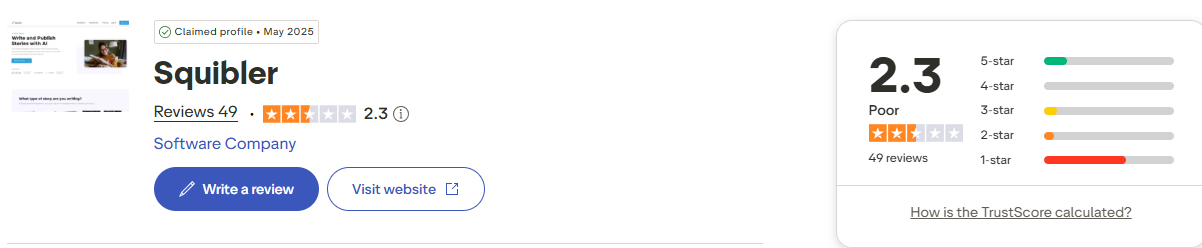
Trustpilot is where the most critical Squibler reviews live. The platform holds a rating of around 2.3 out of 5 across the reviews collected, and the distribution is the alarming part, since a large majority of reviewers leave a single star. The complaints are specific rather than vague, which gives them weight.
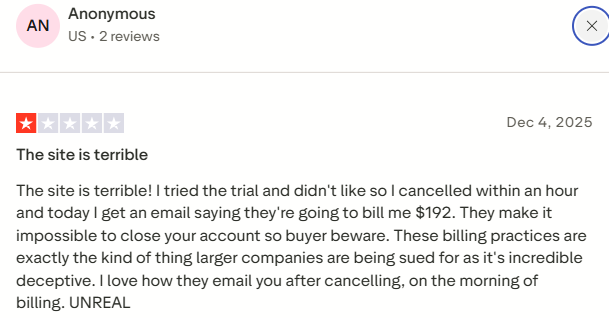
One reviewer described trying the trial, deciding they did not like it, and cancelling within an hour, only to receive an email later stating they would be billed $192.
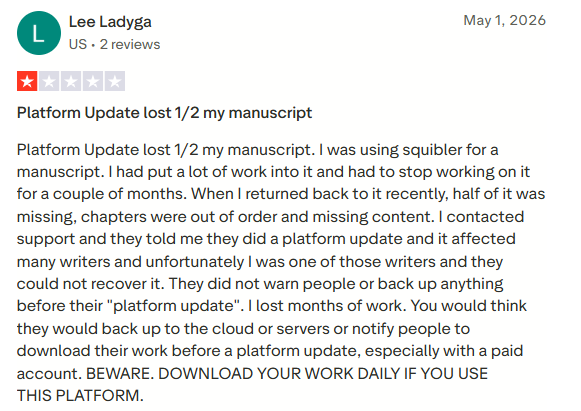
Another described a platform update that left half of their manuscript missing, with chapters out of order and content that support said could not be recovered. These Trustpilot reviews form the core of the case for caution.
Squibler Reddit Reviews
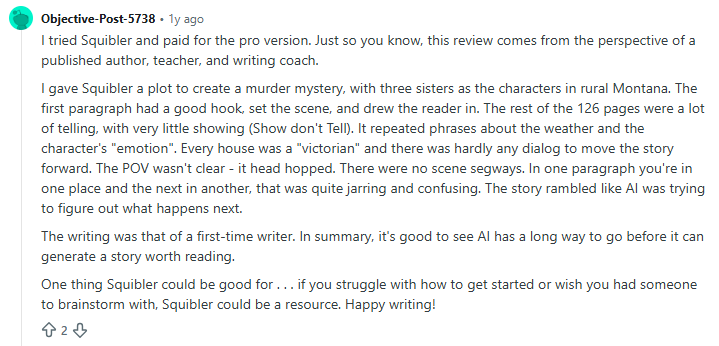
One detailed Reddit review from a user found Squibler useful for generating an engaging opening but disappointing over longer fiction. The AI relied on repetitive descriptions, weak dialogue, inconsistent point of view, and excessive telling.
Despite these issues, the reviewer felt it remains a helpful brainstorming tool for writers struggling to get started.
Squibler Capterra Reviews
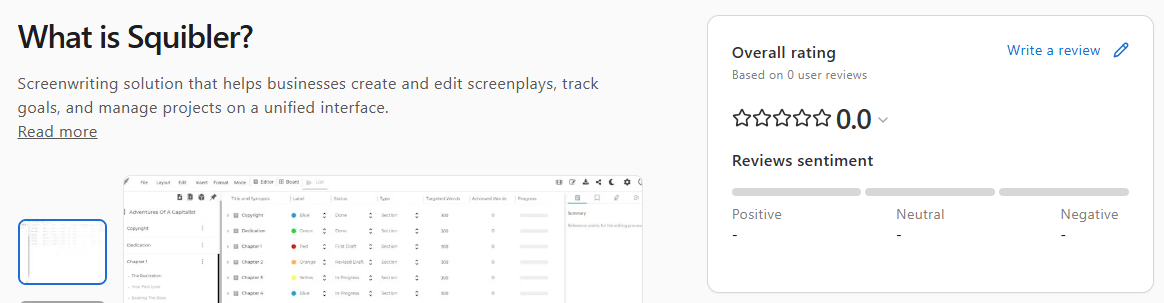
Capterra lists Squibler as a writing and screenwriting platform that helps users create, edit, and organize long-form projects from a single workspace.
While the listing highlights its features, use cases, pricing, and integrations, Squibler currently has no user reviews on Capterra, resulting in an overall rating of 0.0 out of 5.
Recurring Complaint Themes in Squibler Reviews
Across Trustpilot, Reddit, and the smaller directories, the negative Squibler reviews cluster into three specific and repeated problems. Understanding these patterns matters more than any single star rating.
The first is surprise charges after trials, where users expecting one amount are billed a higher one, often despite believing they had cancelled in time.
The second is cancellation and support friction, with multiple reviewers describing repeated failed attempts to cancel and a sense that no human support was available.
The third, and most serious for any writer, is lost work after a platform update, with reports of missing chapters and unrecoverable manuscripts.
Responsive support and a frictionless cancellation flow would resolve much of this, which makes the persistence of these complaints notable.
How to Read Squibler Reviews Sensibly
Online reviews skew toward extremes, since satisfied users rarely write them while frustrated users almost always do. That is a real limitation worth keeping in mind. Even so, the specificity here is telling.
When many independent reviewers describe the same surprise charge amounts and the same cancellation difficulties, the pattern carries more weight than a generic one star complaint would. The sensible conclusion is not that Squibler is a scam, but that its billing and retention practices warrant genuine caution.
A useful frame for evaluating any AI writing platform comes from this guide to choosing an AI writing platform that fits your needs, which stresses matching the tool to your goals and reading the terms before you pay.
Practical takeaway. If you try Squibler, rely on the free plan first, screenshot the pricing you agree to, set a reminder well before any trial or renewal date, use a payment method you can easily dispute charges on, and back up your manuscript outside the platform regularly. These are sensible precautions for any subscription, and the Squibler review history makes them essential here.
Squibler Pros and Cons
Bringing the evidence together, here is the balanced view of where Squibler genuinely helps and where it works against itself. Use it as a quick reference before making a decision.
Pros | Cons |
All in one workspace for planning and drafting, eliminating tool hopping | Frequent billing complaints, including surprise and higher than expected charges |
Excellent templates and a drag and drop planning board | Cancellation and customer support friction reported repeatedly |
Beginner friendly, with a helpful setup tutorial | Reports of lost manuscripts following a platform update |
Generous free plan that lets you test everything | Fiction prose becomes repetitive over long drafts |
Strong for non-fiction structure and fast first drafts | No mobile app, web only |
Exports to PDF, DOCX, and Kindle ready files | No clear disclosure of which AI model powers outputs |
Book proposal step improves consistency before drafting | No brand voice or tone customization controls |
Who Should Use Squibler, and Who Should Not
The most useful way to evaluate Squibler is not as good or bad in the abstract, but as right for you or not. It is an opinionated tool with a clear philosophy, and that philosophy suits some writers perfectly while frustrating others.
The questions of authorship, ownership, and the role of AI in creative work are also worth weighing, and the Authors Guild offers thoughtful, writer focused guidance on those broader issues for anyone considering AI as part of their process.
Squibler Is a Good Fit If You Are
A beginner who struggles with outlining and consistency. The templates and book proposal workflow provide a frame to work within, which is precisely what new writers tend to lack.
A non-fiction writer who needs solid structure more than poetic prose. A screenwriter who can combine the script templates, the visualize feature, and the planning board to good effect.
And anyone who genuinely dislikes switching between an outlining app, a document editor, and a chat window, because the all in one setup was designed for exactly that frustration.
Look Elsewhere If You Are
A serious fiction writer who cares deeply about prose quality, since Squibler's output grows repetitive and will require heavy rewriting. A minimalist who simply wants a clean blank page to type into, because the dashboard of features will feel like clutter. Someone who needs a mobile app, as Squibler is web only.
Or anyone who feels uneasy about auto renewing subscriptions and difficult cancellations, given the review history. If that describes you, the free plan is the only commitment worth making until the billing earns your trust.
How to Cancel Your Squibler Subscription
Given how frequently cancellation appears in reviews, it is worth knowing the steps before you ever subscribe. The official process is straightforward on paper, even if some users report friction in practice.
Log into your Squibler account.
Open your account settings by clicking your profile or account icon.
Locate the subscription or billing section.
Select the option to cancel your subscription and follow the on screen prompts.
Confirm the cancellation, which should take effect at the end of your current billing cycle.
If you encounter an obstacle, contact Squibler support directly and keep a written record of every message. The wisest approach is preventive.
Cancel well before your trial ends rather than on the final day, since several billing disputes appear to occur right at that cutoff.
Squibler has not published a clear refund policy, so you should not count on recovering money after a charge has been processed. Use the free trial period fully to decide, then cancel early if it is not the right fit for you.
Final Verdict on Squibler AI
So is Squibler the best AI book writing software or just hype?
The honest answer sits in the middle. Squibler is a real, capable, structured first platform with excellent templates and a generous free plan, and for beginners, non-fiction writers, and anyone who loves a system around their project, it earns its place.
But the Squibler AI prose is competent rather than exceptional and weakens over long fiction, and the reviews around billing, cancellation, and lost manuscripts are too consistent to ignore. Our recommendation is simple.
Start with the free Squibler plan, test it with your own project, and upgrade only if the workflow truly fits, while watching the billing terms closely and keeping your own external backups. Used carefully, the Squibler AI is a useful drafting partner. Treated as a hands off magic book machine, it will likely disappoint you and may cost more than you expected.
Frequently Asked Questions
Is Squibler free?
Yes, Squibler has a free plan that is free forever. It provides 1,000 AI credits per month and lets you test full book and screenplay creation, so you can see how the tool turns an idea into a manuscript before paying for anything.
Is Squibler safe and legit?
Yes. Squibler is a real, established company founded in 2018, so it is legitimate. That said, treat the subscription with care, since billing and cancellation complaints are common, so use the free plan first and read the terms before you pay.
Is Squibler good for fiction?
Yes. It is good for getting a fiction draft started and for organizing your story, but the AI prose tends to become repetitive over long manuscripts, with telling instead of showing and an inconsistent point of view.
How much does Squibler cost?
There are three plans. Free is $0 with 1,000 credits monthly. Plus is $15.83 per month billed annually, or $29.99 monthly, with 10,000 credits. Pro is $49.17 per month billed annually, or $89.99 monthly, with unlimited credits. Annual billing is charged as a single lump sum.
How do I cancel Squibler?
Log in, open account settings, go to the subscription or billing section, select cancel, and confirm. Cancellation takes effect at the end of your billing cycle. Cancel early rather than on the last day, and keep records, since some users report friction at the renewal point.
Does Squibler have a mobile app?
No. Squibler is a web based platform that runs in all major browsers but does not have a dedicated mobile app, so it works best on a desktop or laptop.
Is Squibler worth it?
Yes. It can be worth it for beginners, non-fiction writers, and anyone who wants planning and drafting in one place, especially through the free plan. It is less worth it if you want polished fiction prose, a minimalist editor, or complete confidence in the billing. Test it free before committing.
Marcus Ryder
Reviews and Alternatives Editor
Marcus Ryder is an author on SmutFinder and reviews the AI tools people use to write stories and roleplay. He never covers a tool until he has used it himself, so he signs up, runs real prompts, and checks the pricing before he says anything. His reviews are honest about what a tool does well and where it falls short. He also writes the guides that point readers to better alternatives, and compares tools when two of them look the same on paper. Years of reviewing software and tech mean he can tell a real product from a good sales page.
Ready to start your writing journey?
Join thousands of writers who are already creating amazing stories with our AI-powered platform.